How Much Is CapCut Pro? Full 2026 Pricing Breakdown
I’ve kept a close eye on CapCut’s pricing over the past couple of years, and the update that landed in early 2026 is the biggest one yet. If you opened the upgrade screen recently and the number looked different from what you remembered, here’s the good news: it’s not a mistake. CapCut rebuilt its entire subscription lineup, and the plan everyone used to call “Pro” simply moved into a new spot with a new name.
Quick note on where this comes from: rather than one source, this is pulled together from user community threads comparing old and new charges, billing discussions where people compared notes on renewals, and CapCut’s own pricing page — cross-checked for accuracy.
Let’s walk through exactly what you get at each tier, and how to find the best value for your workflow.
The Current Lineup
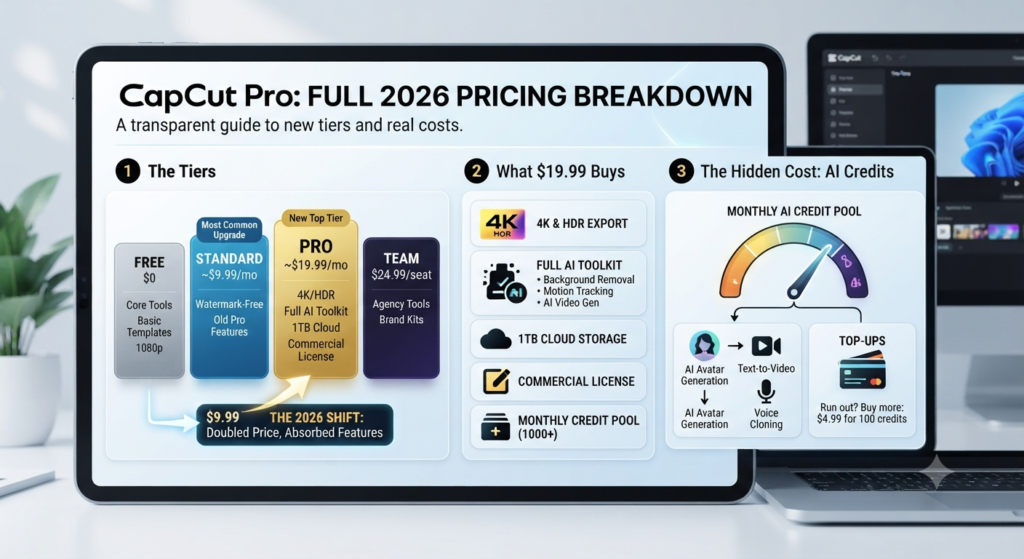
CapCut now offers four tiers, giving you more room to pick exactly what fits:
- Free — Core editing tools, basic templates, 1080p export, and AI voiceover with text-to-speech. A strong starting point for everyday short-form editing.
- Standard — About $9.99–$10/month, billed monthly in most regions. This tier carries forward everything the original Pro plan offered, with watermark-free export as the headline benefit.
- Pro — Around $19.99/month, or $179.99/year (about $15/month if you pay annually). This is the new top tier, built around the full AI toolkit, 4K/HDR export, and 1TB of storage.
- Team — About $24.99 per user/month, designed for agencies collaborating across shared brand kits and asset libraries.
Standard now sits at roughly half the price of the new Pro tier, which gives creators a clearer choice: pay less for the essentials, or step up to Pro when you’re ready for the full AI toolkit.
What $19.99 a Month Gets You
The new Pro tier consolidates a lot of value that used to be spread across separate plans:
- 4K and HDR export, no resolution ceiling
- The full AI toolkit — background remover, motion tracking, noise reduction, AI image and video generation, voice cloning, speaker-ID captions
- 1TB of cloud storage, synced across devices
- A generous monthly pool of AI credits (usually north of 1,000, depending on region and plan)
- A commercial license for anything you export
- The complete royalty-free music and asset library
If you were subscribed before the restructure, there’s a good chance your account has already rolled onto the new Pro pricing — worth a quick check of your billing history so you know exactly what you’re getting for the new rate.
Getting the Most Out of Your AI Credits
Here’s a detail that’s genuinely useful to know upfront: everyday editing — trimming footage, dropping in captions, basic transitions — doesn’t touch your AI credits at all. Those are reserved for the generative features: text-to-video, AI avatars, voice cloning, and image generation.
Once you use up your monthly pool, topping up is simple and affordable — around $4.99 for 100 credits, valid for a generous two years. If AI generation is a big part of your workflow, planning for the occasional top-up alongside your subscription helps you budget accurately and get full value from the toolkit.
Monthly or Annual — Finding the Better Deal
Paying yearly is where the real savings show up: it brings your effective cost down from $19.99 to about $15 a month, saving you roughly $60 over the year. If you already know CapCut is part of your regular workflow, annual billing is the smart move.
If you’re still testing the waters, starting monthly gives you flexibility — just set a reminder to review before your next renewal so you stay in control of the plan that fits you best.
One more way to maximize value: subscribing through CapCut’s website directly typically costs a few dollars less per month than going through the App Store or Google Play, since those platforms add their own fee. Checking out on the web app is the easiest way to get the best price.
Which Tier Actually Fits Your Work
Here’s how I’d think about matching a plan to what you actually do:
- Casual creator, posting occasionally for fun or a small following — Free is genuinely enough. Multi-track editing, keyframes, text-to-speech, and a solid template library cover most short-form content comfortably. Upgrade whenever you find a specific feature you need.
- Social media creator posting regularly, no client work — Standard is the sweet spot. Watermark-free export is usually the one thing worth paying for at this stage, and it comes in at half the cost of Pro.
- Freelancer or creator doing client work, needs 4K or a commercial license — Pro earns its keep quickly here. The license and 4K export are exactly what client work tends to call for.
- Heavy AI workflow — text-to-video, avatars, voice cloning as core tools — Pro is the right entry point, and keeping an eye on your credit usage for the first month helps you plan top-ups confidently.
- Agency or team collaborating on shared projects — Team is purpose-built for this. Shared brand kits and asset libraries save real coordination time once more than one or two people are editing together.
A great way to decide: spend a week or two on the free tier, note where you’d genuinely benefit from more, and upgrade to the plan that solves that specific need. It’s an easy way to make sure you’re getting full value from whatever you pay for.
Pricing Can Vary by Region — Here’s How to Check
CapCut’s own pricing pages note that your final checkout price depends on region, device, account, and any active promotions. Local pricing can look different from the US figures above, so take a quick look at what your own app or account shows — that way you know you’re getting the most accurate, up-to-date number for your location.
Quick Reference
| Plan | Monthly | Annual (effective/mo) |
|---|---|---|
| Free | $0 | $0 |
| Standard | ~$9.99 | Monthly only in most regions |
| Pro | ~$19.99 | ~$179.99/yr (~$15/mo) |
| Team | ~$24.99/user | Varies |
Bottom line: CapCut Pro runs about $19.99/month or $179.99/year in 2026, giving you 4K export, the full AI toolkit, and 1TB of storage in one place. Pair it with annual billing for the best rate, keep an eye on AI credit usage if your workflow leans heavily on generation, and check your own account for the exact regional price before you subscribe.